Whether you are an HR professional who needs specimen certificates for training, a developer building a health application, a designer creating mockups, or a student studying healthcare administration — creating a realistic Indian medical certificate online is straightforward with the right tool. This guide walks through the process step by step.
Who Legitimately Needs Online Certificate Generation?
There are many entirely legitimate reasons to generate a realistic medical certificate specimen:
- HR managers training staff on how to identify valid vs invalid certificates
- Developers building health apps, HR portals, or document management systems who need realistic test data
- UI/UX designers creating mockups for insurance claim forms, medical leave portals, or health apps
- Educators teaching medical administration, healthcare law, or HR management
- Content creators and YouTubers creating educational content about medical documentation
Important: Generated certificates are not legally valid medical documents. Using them to deceive any institution constitutes fraud.
Step 1: Go to the Generator
Our Medical Certificate Generator tool provides 15+ authentic Indian clinic and hospital certificate templates — all based on real-world Indian prescription pad formats. Navigate to the generator and choose a template that matches your requirements.
Step 2: Choose Your Template
Templates include:
- Formal government hospital formats (useful for sick leave and fitness certificate demos)
- Private clinic formats (small single-doctor clinics, common in urban India)
- Multispeciality hospital formats (larger hospitals with departments)
- Maternity hospital formats (specialist care context)
- Dental clinic formats
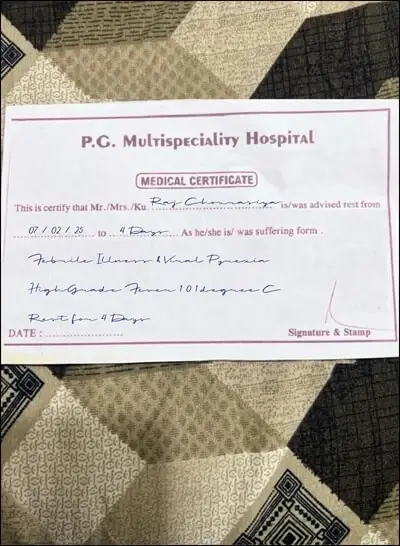
Step 3: Fill In the Details
Use the live editor panel to fill in:
- Patient name, age, and gender
- Diagnosis or medical condition
- Date of examination
- Rest period (start and end dates)
- Doctor's name and clinic details
- Registration number (for authenticity in demos)
The preview updates instantly as you type — you see exactly what the final certificate will look like before downloading.
Step 4: Download as PNG or PDF
Once you are satisfied with the preview, click the download button to export as a high-resolution PNG (2× resolution for crisp output on retina displays) or PDF. The file is generated entirely in your browser — no data is uploaded to any server.
The DEMO watermark can be toggled on or off depending on your use case — leave it on for any document that could potentially be used outside of its intended staging context.
Frequently Asked Questions
Is it illegal to generate a medical certificate online?
Generating a specimen for educational, design, or development purposes is not illegal. Using a generated certificate to deceive an employer, institution, or government agency is fraud and carries criminal penalties under the IPC.
Does my data get stored when I use the generator?
No. Medical Certificate Generator runs entirely in your browser. Nothing you enter is transmitted to or stored on any server.
Can I customise the clinic name and doctor details?
Yes, all fields including the clinic name, doctor name, qualifications, and registration number are editable. This makes the tool useful for creating realistic-looking specimens for specific mockup scenarios.
What format does the certificate download in?
Primary export is PNG at 2× resolution. PDF export is also available. The output is suitable for both print and digital use.
Disclaimer: Certificates generated by Medical Certificate Generator are for educational and demonstration use only. They are not legally valid medical documents.
Free Tool
Generate a Medical Certificate Now
Create a realistic handwritten-style medical certificate in seconds. Choose from 15+ authentic Indian clinic and hospital templates — completely free, no sign-up required.
No signup · No watermark · Instant PNG & PDF download